From flexible data delivery and geographic regulatory compliance to developer-first workflow building in Intellistack Streamline, this month’s updates help teams move data where it needs to go, understand where data subjects are, and build Streamline workflows in minutes with our new developer-first API.
To view full release notes for Formstack products and Intellistack Streamline, scroll down past the highlights. You can also click here to view full release notes from November and by month from the past year.
NEW: You can now subscribe to our RSS feed for product update blogs using this link.
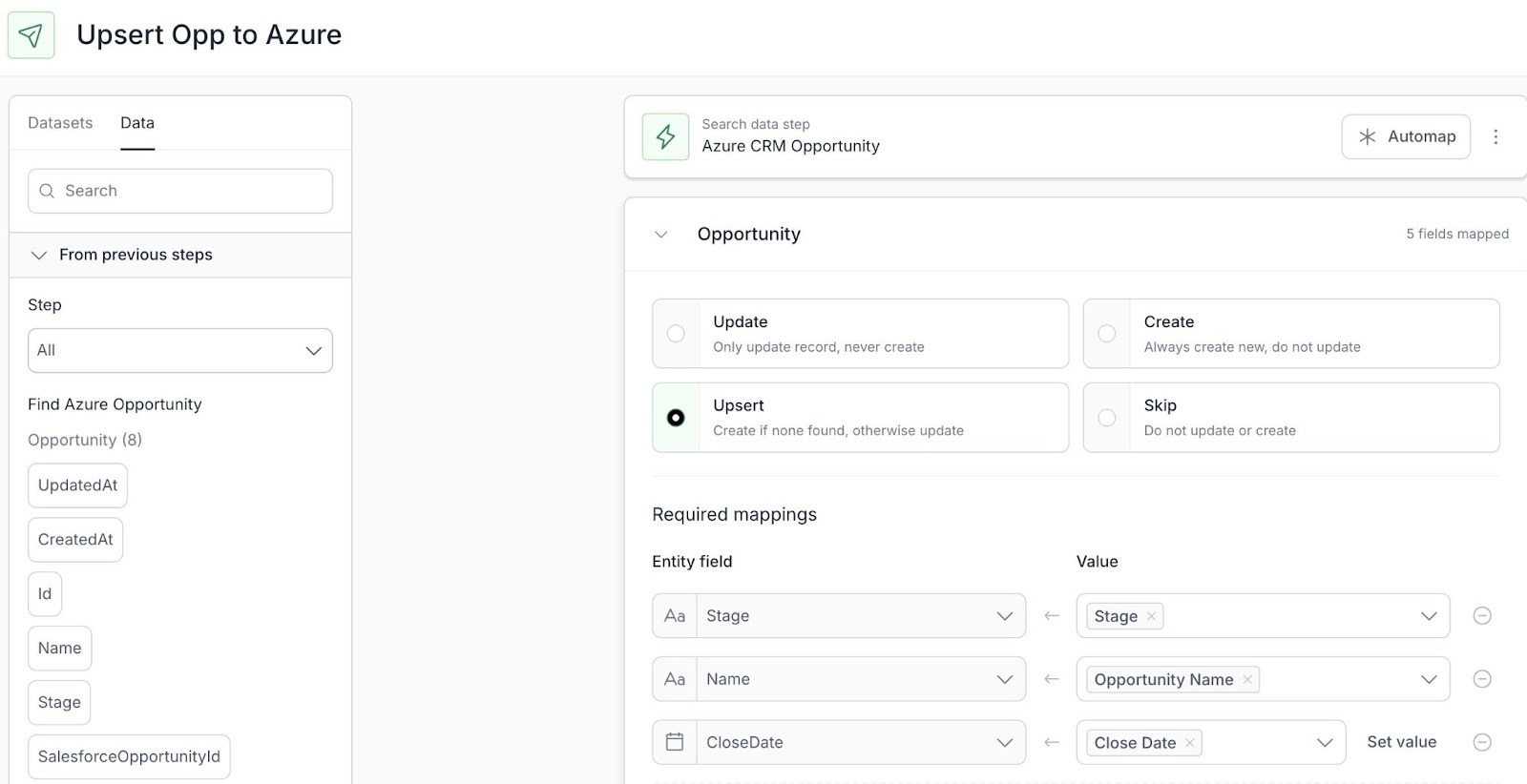
Send data anywhere with the new Deliver Data step in Intellistack Streamline
The Deliver Data step in Intellistack Streamline now enables workflows to intelligently update existing records or create new ones across all your connected systems. No more manual data transfers between platforms - your workflow can automatically send updated information back to its source while routing new data to the right destinations. This feature transforms Streamline into a complete workflow automation solution that keeps all your systems in sync.
Build workflows in minutes with our developer-first workflow API
With the new Intellistack Streamline Workflow API, development teams can define, version, and deploy workflows in structured JSON. Workflows live alongside application code, move easily between environments, and can be generated or audited with AI—helping developers build and scale automation faster. With a consistent schema and AI-friendly design, teams can generate, audit, and optimize workflows faster—without clicking through complex UIs.
Automatically trigger Intellistack Streamline workflows from Salesforce
You can now automatically launch Intellistack Streamline workflows directly from Salesforce. Use the Streamline action in Salesforce Flow or trigger workflows via Apex in custom logic and batch processes—eliminating manual starts and enabling seamless, cross-platform automation.
Activate Databricks data inside your Intellistack Streamline workflows
Intellistack Streamline now connects directly to Databricks, allowing teams to activate analytical data from their lakehouse inside workflows. Pull insights in, write results back out, and eliminate manual exports while keeping enterprise data governed and centralized.
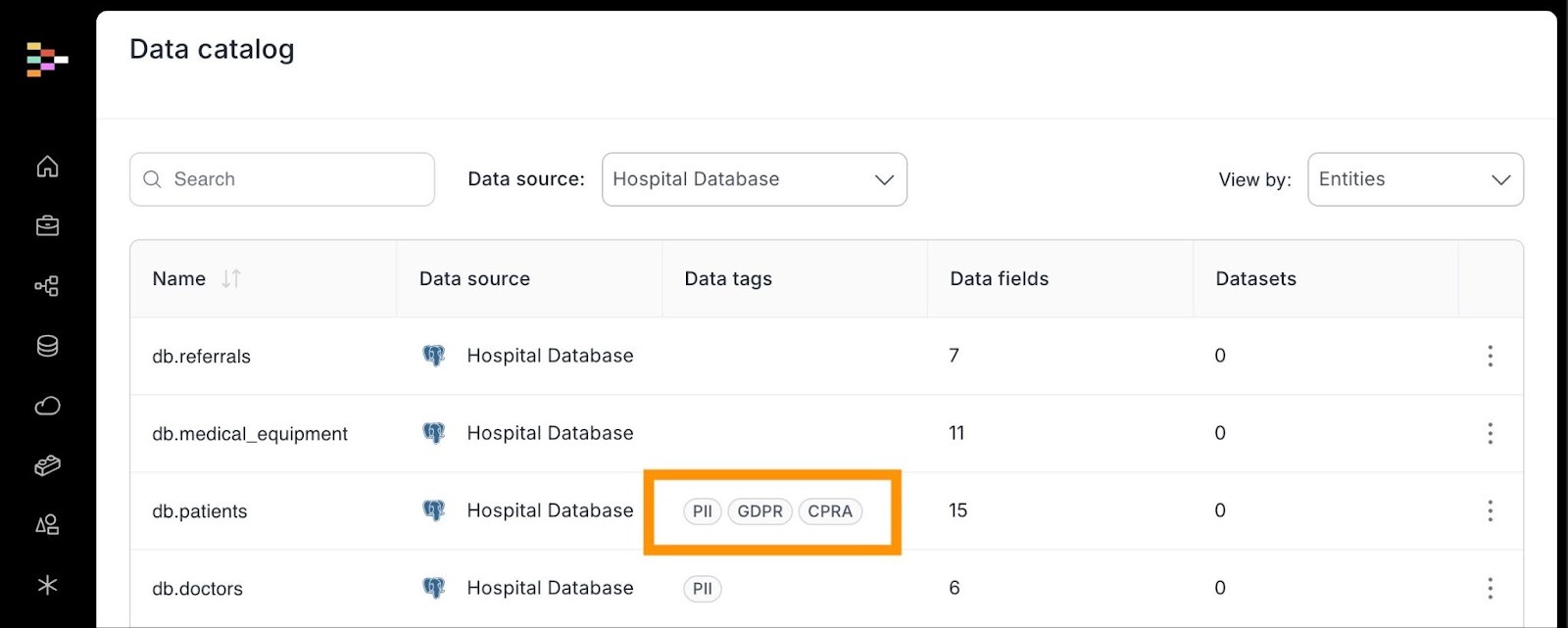
Know Where Your Data Subjects Are with Automatic Geoclassification
Intellistack Streamline now automatically classifies geographic data to help organizations meet GDPR and CPRA requirements. By identifying where data subjects are located, teams gain clearer visibility into regulatory obligations without manual review.
December 2025 Release Notes
Continue exploring this month’s updates for Formstack products and Intellistack Streamline by reading the full release notes below. You can also click here to view full release notes from November and by month from the past year.
Formstack Forms
New features:
- Prefill API Service — Forms API v2025 has been updated to add the new Prefill service. This allows API users to prefill a form with secure information and receive a link to allow the consumer to finish completing their submission.
- Implemented a new rich text editor across Forms to enhance security and provide a consistent editing experience. The updated editor replaces the previous, ensuring better performance and reliability.
- Improved accessibility compliance for live forms by addressing WAI ARIA pattern concerns. Forms now better follow accessibility standards to support all users, including those using assistive technologies.
- Enhanced V2 API key management by automatically reassigning API keys to the first available admin when a user is deleted. This prevents API keys from being deleted and ensures continuity of integrations.
Defect fixes:
- Fixed an intermittent issue with V4 forms where UTM tracking parameters were not being captured correctly via the Campaign Plugin
- Resolved a 500 error that prevented users from uploading logos to Portal settings. Users can now successfully add and save custom logos to their portals
- Fixed an issue where radio button fields with a value of "0" were not saving correctly when using Save and Resume. Selected values now persist properly when users return via Save and Resume links
- Corrected a broken hyperlink in Workflow Forms email banners that was directing users to an incorrect help article URL
- Fixed a display issue where file uploads accessed via Save and Resume links were incorrectly showing as 1 Byte. File sizes now display correctly, though files submit and function as expected
- Verified and resolved issues with Salesforce file attachment functionality to ensure files transfer correctly to Salesforce records
- Fixed a data storage issue where form submissions with both S3 AWS storage and Google Drive integration (with "Do not save data in database" option) were not routing data correctly. Data now saves to the intended destination
Formstack Documents
New features:
- Enhanced application security by implementing Content Security Policy headers to protect against cross-site scripting (XSS) and injection attacks.
- Strengthened security by correcting HTTP Strict Transport Security configuration to ensure secure HTTPS connections and protect against potential attacks.
- Updated third-party component libraries to address known security vulnerabilities and improve overall application security.
- Updated PipeDrive integration to use the latest version of their API.
Defect fixes:
- Fixed an issue where Podio webhooks were triggering duplicate document merges.
- Resolved an issue where unwanted page breaks were appearing when looping through lists in document templates.
- Addressed multiple PHP errors that were preventing Excel document types from generating correctly.
Formstack Sign
Defect fixes:
- Fixed an issue where multiple documents were merging in incorrect sequence.
- Resolved an issue where signing pages retrieved via API were rendering before the document was fully ready.
- Fixed a delivery issue preventing signing links from being sent via SMS.
- Corrected an issue where senders were receiving multiple notification emails for the same document.
- Fixed document display and signature tracking issues where signed documents were not updating status correctly in the audit trail
- Optimized the organization deletion process to handle accounts with large numbers of documents more efficiently
Formstack Workflows
Defect fixes:
- Fixed an issue where workflows were getting stuck even when logic step conditions were properly met.
Formstack Documents for Salesforce
V1.367
- API Upgraded to Salesforce Version v65
Defect fixes:
- Fixed the Export/Import Mapping to create duplicate field mappings
- Added "Context__c" field to the LogEvent__c object and permission sets
Intellistack Streamline
New features:
- Salesforce Automated Workflow Trigger — Automatically launch Streamline workflows from Salesforce using our native action in Flow, or by calling Apex from your custom triggers and batch processes. This eliminates the need for manual triggering of workflows, allowing you to create seamless, cross-platform automation between Salesforce and Streamline.
- Data Integration: Databricks — Intellistack Streamline now connects directly to Databricks, enabling you to activate enterprise analytical data within your workflows. Access data from your Databricks lakehouse and write workflow results back - all without manual exports or copying data between systems. This integration brings your organization's consolidated business intelligence data into automated workflows seamlessly.
- Geoclassification — We expanded Streamline’s automatic classification engine to support geographic tagging. Based on location data like addresses or phone numbers, we’ll auto-apply regulatory tags (e.g., GDPR, CPRA) so your team can route, retain, and protect sensitive data according to the right laws—automatically.
- Workflow Builder API — We launched a structured, API-friendly schema that lets both developers and AI agents build workflows with fewer calls and greater clarity. This unlocks intelligent automation, step duplication, and a smoother path to first-time user success.
- Enhanced Deliver Data Step — Streamline's Data Write-Out capability now enables workflows to intelligently update existing records or create new ones across all your connected systems. No more manual data transfers between platforms - your workflow can automatically send updated information back to its source while routing new data to the right destinations.
Defect fixes:
Workflow
- Fixed error handling when integration notifications fail
- Fixed 404 error when running workflows
- Fixed title field not being focused when adding a new step
- Fixed inability to create logic conditions in certain workflows
- Fixed forms not accepting "&" character in names
- Fixed inability to add dynamic data to email deliveries
- Fixed text cursor jumping to top in notification settings
- Fixed inability to change field order in activation settings
- Fixed session links sent via SMS being incorrectly flagged as spam
- Fixed error message when loading the projects page
Document Generation
- Fixed multiple signer issues in quick send collaboration
- Fixed step names displaying incorrectly in Workspace
- Fixed "Assigned to you" view not showing document details
- Fixed document timeline showing versions in wrong order
- Fixed "inherit from previous step" option in document builder
Forms
- Fixed inability to copy fields with long names
- Fixed field labels pushing content out of alignment
- Fixed hidden section fields not expanding properly
- Fixed form not scrolling to top when showing errors
- Fixed required field indicator not displaying in red
- Fixed issues when deleting steps with mapped data
Data Management
- Fixed rich-text fields not appearing in field mapping options
- Fixed Google Drive file URLs showing as files
- Fixed Google Drive file upload dropdown display issue
- Fixed Snowflake multiple primary key values not saving
- Fixed Airtable Contact + Account prefill not working
- Fixed number formatting when saving to PostgreSQL databases
Omni AI
- Fixed an issue where the wrong command menu appeared when using keyboard shortcuts
- Fixed validation errors when AI features are turned off
- Fixed system error in AI error handling
- Fixed sidebar not opening after completing onboarding
- Fixed chat button not working correctly
- Fixed thread titles not generating automatically
- Fixed AI prompt closing while request is still processing
- Fixed chat not auto-scrolling to new messages
- Fixed messages not respecting thread context
- Fixed AI extraction getting stuck on incoming webhooks
- Fixed AI summaries sometimes showing both deleted and added text
Administration
- Fixed an issue where the "Updated by" user information was not displaying correctly after changes were made to the profile manager
- Fixed organization name not showing on Organization Acceptance screen
- Fixed page refresh redirecting to wrong location in profile manager
- Fixed an issue where users with the builder role could access more user data than intended via Omni query
- Fixed formatting issues in user management tabs